An app blocker you can't talk your way out of
Most app blockers have a way out built in. Watch an ad, wait out a timer, press snooze, or just open the settings and raise the limit you set this morning.
That is fine until the moment you actually need the block to hold. Hush Strict mode has no ad, no timer and no bypass button.

Free on Android. Only Strict is paid.
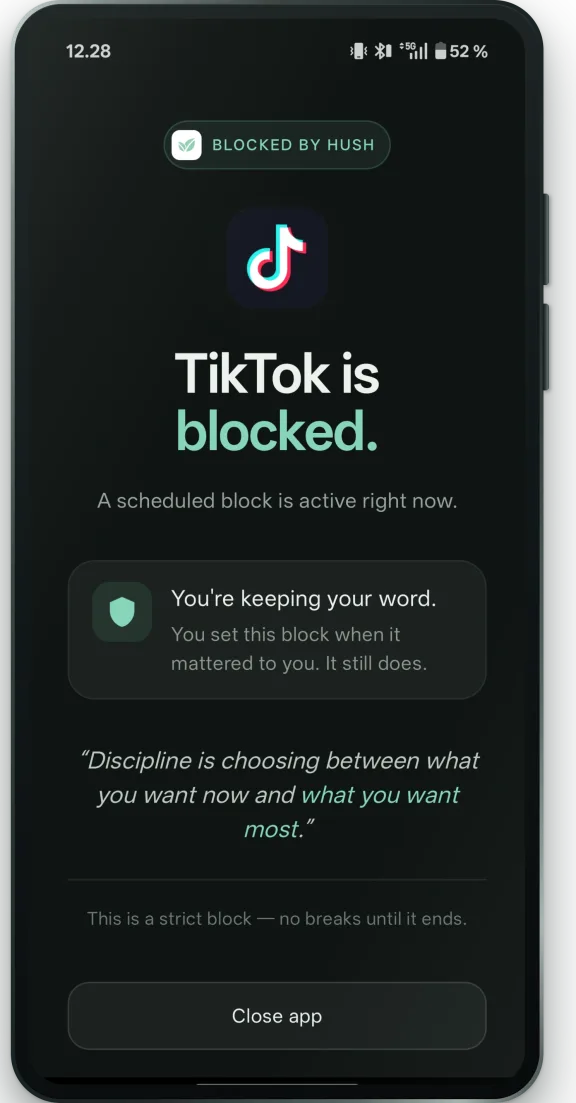
This is the whole screen
When a Strict block is running and you open a blocked app, this is what you get. There is nothing on it that returns you to the app.
No countdown to wait out, no “just five more minutes”, no ad to watch. The only button closes the app. The block ends when the session you set ends.
Three levels, and you pick the one you'll actually keep
Strict is deliberately the last of three. Starting there tends to end with the app uninstalled by Wednesday, so the first two are free and gentler:
- EasyFree
Watch an ad for 5 more minutes
- HardFree
Same, but only 3 times a day
- 🔒 StrictPro
No ads. No bypassing.
Easy and Hard cost nothing and cover up to five apps. Strict is $31.99 a year, or $79.99 once.
The gaps most blockers leave open
Split-screen and floating windows
Blocking the icon is not enough on Android. An app you cannot open from the home screen will often still open in split-screen, in a floating window, or in freeform mode. Hush covers those routes too.
Swapping between apps
A per-app timer means running out on one app and opening the next. Hush can give a group of apps one shared budget, so the swap buys you nothing.
Editing the limit mid-session
A limit you can raise while you are staring at it is a suggestion. During a Strict session the block cannot be dismissed or postponed from inside Hush.
What Hush does not do
- It cannot stop you uninstalling it. A determined person can always remove the app. Hush makes the easy escape routes hard; it does not pretend to be a cage. If that is the part you need, AppBlock can lock the uninstall in exchange for device admin permission.
- Android only. There is no iPhone version, and nothing that covers a laptop or a browser.
Common questions
What happens when a Strict block starts?
Opening a blocked app gives you a full screen with nothing on it that returns you to the app. No countdown to wait out, no five-more-minutes, no ad to watch. The only button closes the app.
Can I end a Strict session early?
No, and that is the point of it. The block ends when the session you set ends and cannot be dismissed or postponed from inside Hush before then. If that sounds like too much, start on Hard — it is free and it gives you three escapes a day.
Can I just uninstall Hush?
Yes. A determined person can always remove an app from an Android phone, and Hush does not pretend otherwise. What it does is make the easy escape routes hard, so breaking a block costs more than a tap.
Is there an Android app blocker that cannot be uninstalled?
Not a legitimate one. Android lets you remove any app you installed, so a blocker advertising itself as uninstall-proof is either leaning on device-administrator permissions that Google restricts, or overstating what it does. The honest version of that promise is a block you cannot talk your way out of while it is running.
Is Strict mode free?
No. Easy and Hard are free for up to five apps. Strict is $31.99 a year, or $79.99 once.